TL;DR
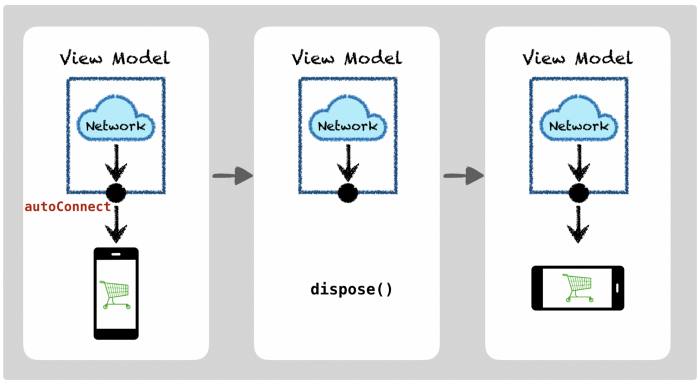
To preserve and share the state of a stream (e.g. for rotations, dialogs), we can host the stream in Android’s ViewModel by using .replay(1).autoConnect() to share the stream’s state and a Relay to share the input.
For example:
class MyViewModel : ViewModel() {val inputStream = PublishRelay.create<Input>()val viewsState: Observable<ViewState> =
inputStream
            // Transformed to a stream of view states
            .toViewState()
            // Shared between subscribers
            .replay(1).autoConnect(1) { disposables.add(it) }
}
Full example here.
Sharing the state
When disposing a connection to an Observable that is a not a ConnectableObservable, the entire stream is disposed.
For example, when subscribing to a network request in an Activity, we lose the state on rotation (or any other configuration change):
endpoint
    .getData()
    .subscribe {                   // Create a connection
        titleView.text = ...       // Present the data
    }
    .let { disposables.add(it) }   // To be disposed in onDestroy()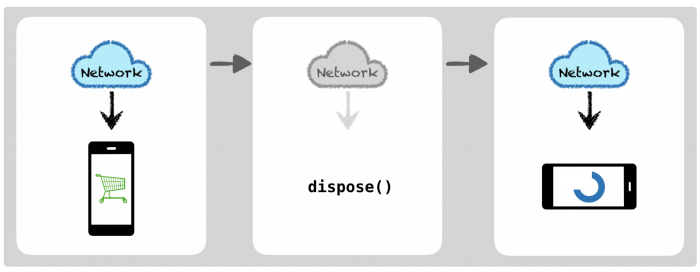
We may restore the view state in some way (e.g. with savedInstanceState), but then on rotations we would create another network request (and cancel any network request if active).
Hosting the stream in a lifecycle.ViewModel, we can have a stream lifecycle decoupled from the Activity’s. Using .autoConnect() we define the Observable to connect upstream (to the endpoint in this example) when the first Activity subscribes. When the activity disposes the connection, the upstream is kept alive. When the ViewModel itself is disposed (in onCleared) we dispose the upstream:
class MyViewModel(
    val endpoint: Endpoint
) : ViewModel() {    private val disposables = CompositeDisposable()    val viewState: Observable<Data> =
        endpoint
            .getData()            // Replay the last emitted value to new subscribers..replay(1)            // A single upstream connection is made on
            // the first subscription and shared with
            // all future subscribers.
            .autoConnect(1) {
// Upstream disposable kept for later disposal.
                disposables.add(it)
            }    override fun onCleared() {
        disposables.dispose()
        super.onCleared()
    }
}
Sharing the input
To have user input as the origin of the stream hosted in a ViewModel, we can use a Relay. To extend the example above, on user requests to refresh we create new network requests:
val inputStream = PublishRelay.create<Input>()val viewsState: Observable<Data> =
    inputStream
        switchMap {
            endpoint.getData()
        }
        .replay(1).autoConnect(1) { disposables.add(it) }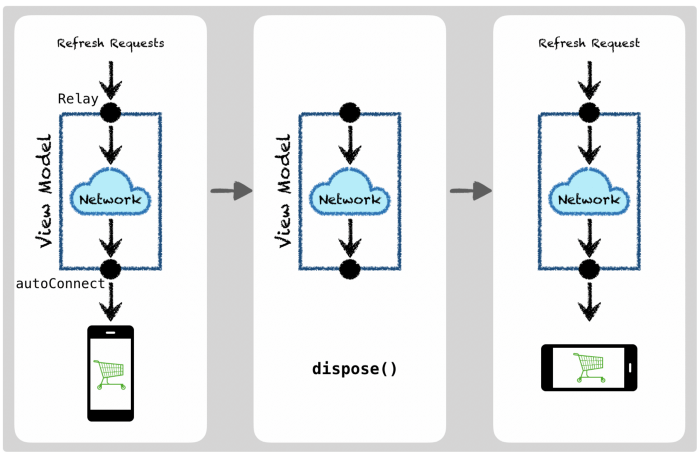
Examples of stream states
Most RxJava operators have some state that we may want to preserve. Some examples:
.scan() stores its last output:
clicks
    .scan(0) { state, _ -> state + 1 } // Count clicks
    .subscribe { … }
.combineLatest() stores its last inputs:
Observable
    .combineLatest(dataStream, filterStream) { data, filter ->
        data.filter(filter)
    }
.switchMap() maintains the active downstream connection:
onOffToggle
    .switchMap {
        // Toggle a connection to a data source
        when (it) {
            true -> source.data()
            false -> Observable.empty()
        }
    }
Summary
Generally speaking, .autoConnect() (and its fellow operators) allow us to host a stream and maintain its state in a separate lifecycle from its subscribers.
Tying a stream’s lifecycle to a ViewModel’s, we can share its state across rotations. The state and input can also be shared with other views — for example between a dialog and an Activity, or between Fragments in a master-detail design. We can also choose to host streams in other lifecycles, for example for implementing a global in-memory cache, or to have a lifecycle tied to a specific module.
Thanks to Charles Durham.